Wednesday, November 2, 2011

How To Motivate Yourself To Be A Successful Entrepreneur


The Motivation Equation

Do you wake up each day excited to work on your business?

Do you spend time thinking about your business even when you’re not at work?

For many, motivation is difficult to sustain. Some days are better than other. However, when you’re truly excited about your business, and it becomes an active and positive part of your life, everything changes.

When you wake up each day and you feel motivated and excited about your business, it opens the door for the other aspects of an entrepreneurial mindset.

You look for opportunities, you seize challenges, find creative solutions for problems and you effectively share your vision with others.

When you’re not motivated it becomes difficult to do anything other than manage your business. And you’re not a manager – you’re an entrepreneur!

Let’s take a look at a few key steps you can take to find motivation for your business.

Note: If you can’t summon any motivation for your present business, consider finding an idea that does inspire and motivate you.

#1 Gratitude

Gratitude is the ability to recognize and appreciate what you have. It’s also a practice. How often do you feel gratitude? Do you feel appreciative of:

The things you have?The people in your life?Your daily experiences?

Gratitude accomplishes amazing things. It helps you stay positive and it has a dramatic affect on your motivation. Why? Because gratitude is something you want to feel more of and you want others to feel. It permeates your spirit and becomes part of who you are.

In order to benefit from gratitude it’s important to make it a part of your life.

Consider creating a habit of gratitude.

Start saying, and feeling, “Thank you” when you experience something wonderful or receive something in your life.

Start acknowledging the things you are grateful for. You can journal or simply create a daily practice of mentally listing the things you’re grateful for.

#2 Focus On Your Strengths and Joyous and Fulfilling Activities

What do you love to do? What are you good at?

Don’t know? Make a list. Start with the activities you love to do and the topics you’re passionate about.

Then create a plan to integrate these joyous and fulfilling activities into your day. Make sure you do something you love each and every day. It is sure to get you out of bed in the morning and excited and motivated for your day.

#3 Celebrate

Celebrate your successes. Each day, whatever you accomplish it doesn’t matter if it is big or small, celebrate your successes. It’ll add a smile to your face, a bounce to your step, and it will help you stay motivated to achieve more success.

#4 Get Inspired

One great way to stay inspired and motivated is to surround yourself with inspiration. So what inspires you? Music? Art? Books?

Create a home office that you enjoy spending time in. Surround yourself with the things you love. And of course, take the time to surround yourself with inspiring people.

It’s hard to feel unmotivated with such greatness all around you.

#5 Take Breaks

An annual vacation isn’t enough. It’s very important to your mental health and wellbeing to take breaks.

Schedule daily breaks. Make sure to take time off weekly and monthly. And of course don’t forget those annual vacations if that’s part of your tradition.

How many scheduled breaks do you take?

Even a few hours or a day or two can really make a difference. It gives you time to recharge and find that original source of inspiration and motivation.

Motivation can wane from day to day and even from task to task. However, being able to sustain motivation for your business is important. You want to feel excited about you business.

It’s the only way to really make it grow. Speaking of growth, the next step is all about tapping into your creative side and generating great, not to mention profitable, business ideas.

Fastest way be an succesful entrepreneurto inspire and motivate entrepreneursThe ability to inspire and motivate yourselfpositive keywords to motivate yourselfmotivation is the stuff that permiates your entire beingmotivate entrepreneurhow to motivate yourself to do your business with present obstacleshow to motivate yourself to be successfulhow to motivate yourself entrepreneurway to motivate yourself entrepreneur

Related posts:

4 Traits Of A Successful Entrepreneur7 Tips On How To Motivate Yourself To Work From Home5 Powerful Strategies For Creating A Successful Online Business10 Common Characteristics Of Successful EntrepreneursHow To Develop And Sustain A Positive Attitude

View the original article here

How To Use Facebook Places


Facebook Pages helps business owners to get more exposure and interactivity to their local, physical businesses.

People who’ve never heard of your business can find you by clicking on “Nearby Places” in their mobile apps.

They can also find your business through their friend’s walls, when they “Like” your business or “check in” to your business.

Though there are a few other local checkin-based apps (e.g. Foursquare,) none can boast Facebook’s 500+ million users.

Here are some of the main features and benefits of using Facebook places for business owners.

Appearing on Friend’s Feeds

Anytime someone checks into your business, it’ll also show up on their friend’s feeds.

Appearing in the iPhone’s “Nearby Places”

When someone’s near your business, they can easily find you by clicking “Nearby Places” or by searching for a specific type of business. (i.e. “restaurant.”)

Appearing in the iPhone’s Friends Checkin

iPhone users can also see a list of all the places their friends are at or have been to.

Likes and Checkins Displayed

A business that has a lot of people checking in, liking and posting on their wall has a lot of social proof.

Much like how people prefer to go to crowded restaurants rather than empty restaurants, social proof will help you get more people through the door through perceived popularity, as well as help you get even more likes, checkins and comments. It’s like a snowball effect.

Through effective promotions, you can get a lot of people to like and checkin to your place.

That, along with the snowball/social proof effect, can turn into a very effective marketing mechanism.

Example: A cafĂ©’s credibility increased through having many users.

Having Your Own Wall & Pictures

Once your page is active, you’ll have an interactive wall where others can interact with one another, a photo gallery where you can put business-related shots, as well as all the other features of Facebook Places.

Detailed Business Information

You can put a lot of details that your users would find useful on your Facebook Place.

They’ll be able access this information online or on their mobile device.

Users will be able to find your website, your hours of operation, your phone number, your address and even a map showing your location.

As you can tell, Facebook Places offers some incredible opportunities for business owners to connect with their customers, as well as to make it easier for more people to find their business.

How to add emo in facebook wallfriends empty list on facebooknear placeswhat is EMO? in facebook using

Related posts:

How To Use Twitter Feed To Automatically Post Your Blog Posts To Twitter And FacebookHow To Set Up Facebook’s New Messaging/Email SystemHow To Navigate And Understand Stats In Google PlacesHow To Create A Boost Ad For Your Business On Google PlacesHow To Add A Business On Google Places

View the original article here

How To Be A Problem Solver


The foundation of every business is that it solves a problem for their customers. It doesn’t matter what business model or niche you’re in as a business owner you are a problem solver.

A personal trainer helps people solve the problem of their health and fitness. A cell phone store solves the problem of communication.

In order to grow your business you want to continue to identify the problems your audience and customers are experiencing and solve them with products, services and improved systems.

You are therefore a “problem solver.” A problem solver is also an innovator – you come up with innovative solutions to problems. (Aka a Creative Problem Solver.)

One of the most difficult aspects of the “entrepreneurial mindset” is recognizing innovative opportunities and becoming a creative problem solver.

Peter Drucker, in his book “Innovation and Entrepreneurship, Practices and Principles,” lists several potential sources for innovative opportunity including:

1. Process Need

Process Need is the need for a solution arises from a process. For example, you’re cutting an apple and you want an easier way to remove the skin. Ah-ha! The apple peeler is invented

2. Industry Changes

Any new change to your industry provides new problems and new opportunities. Social media managers are an example of an industry created to solve the problem for an entirely new industry.

3. Demographics

As characteristics of the human population change so do the needs. For example, more self employed individuals means a demand for individual health insurance.

4. Changes in Perception

Perceptions change as cultures change. The “green” movement is a classic example of a change in perception. It has presented many new business opportunities and problems to solve. For example, “green” light bulbs.

5. New Knowledge

As we learn new things new needs and demands are created. For example, you learn that grape seeds help with weight loss, suddenly there’s a need for grape seed extract and supplements.

Innovative opportunity is all around you. The trick is to recognize it.

Thinking about innovative opportunities based on the above criteria may help you begin to develop this skill.

Becoming an Innovator and Problem Solver

It’s really a matter of recognizing opportunities and we’ve already discussed how to accomplish that. Next, create a process whereby you are able to document ideas as they come to you.

It may involve carrying around a small notebook and pen (or it may involve simply dictating your ideas into your phone or mobile device.

Create a habit of recording your ideas.  The more you record them as they come to you, the more ideas will freely flow.

sources for innovative opportunities

Related posts:

How to Generate a Steady Stream of Ideas – Tapping Into Your Creative SideHow To Be More Open And Aware Of OpportunitiesWhat Is An Entrepreneurial Mindset And Why Is It Important?

View the original article here

Step-by-Step Method To Quickly Create Information Products


Developing Information Product for Selling

Planning and making your own product is possible in the world of digital marketing since online customers are always on the lookout for easy way out and do not want to go through hassles of checking offline stores and markets when they are getting similar information and stuff online.

You can easily create digital or information products of your personal interest.

As it is much easier to gather data and create when it is related to your hobby or something that you always wanted to do in your free time, it is easier to sell it.

Some of the popular examples of such information products are e-Books, videos, webinars, audio etc.

If you know the subject and are expert in it, it is very easy for you to develop one of the above mentioned digital products.

How to Create Information Products

Following are some easy steps and guidelines for undertaking the creation and development of information products.

1. The very first thing that you should do is jot down all the ideas and information that you have and something that interests you.

If you are qualified, experienced or knowledgeable about some field or subject then it is better to opt for that topic.

2. Get a credit card processor and shopping cart software to make the buying and selling process smooth and easy for yourself and the customer.

3. Now you can do as much advertising and promotions as you want through SEO techniques or paid advertising services.

4. The second step involves implementation of your ideas that is converting them into a video or audio so that they are accessible by customers.

5. This step is a little more technical since it involves making of website so that you can sell and promote your product.

6. You can do the promotion and selling on your own but you also have the option of availing services of affiliate marketing network if you want support.

Meaning of Information Products

Information products are basically digital products that are based upon knowledge and information and can be delivered in the form of e-books, videos, audios or reports.

Such products are also popular by the name of digital products since it is not something tangible.

On the other hand it tends to pass on information from one person to another and increases the knowledge of the person who receives it.

Therefore, it can also be called a knowledge-based product.

For instance, a very good example of such a product could be an email or tutorials sent to your customer or user.

Since that email contains valuable information or guidelines, it is definitely an information product.

Documents or files that contains information falls under this category and qualify for an information product.

Viability and Functionality of Information Product on Internet

1. Such products are easy to promote and market online since they require almost no financial investment. Only your personal knowledge and resources will come in handy and prove useful in this case.

2. The only thing that you will have to do is get an easy domain name for your website through a web host company and convert your information into PDF format through Acrobat so that they are easily accessible by your users or customers.

3. You can easily make as many duplicates and copies of the files as you want since making online copies is not an issue and does not require you to pay, it can be done free just by copy pasting the material.

4. Information or digital products are just pieces of information that exist in your hard drive. They are not tangible or do not occupy space. Therefore, there is no cost of maintaining inventory or space that you normally require in case of physical goods.

5. Since they are electronically transferred to the customer, there is no shipping cost involved.

6. There cannot be any delay in delivery and purchase of the information product. Everything can be done online, smoothly without any hassle of shipping or delivery issues.

There are unlimited benefits of creating and promoting such products since they require less time, energy and finances.

And you can have your very own business that is easy to maintain and control.

Physical goods are difficult to manufacture and maintain since they need proper raw materials and involve huge cost and investment.

You will need to hire a good manufacturer which also involves finances.

Once the product gets manufactured you will have to arrange for a space and hire someone to maintain and keep a check on your inventory.

Each step requires lot of resources in terms of labor and money.

Shipping is going to be yet another issue which has to be handled professionally so that the process is not delayed and customers gets the delivery in time.

All this has to be done with proper and organized manner and for that you will have to spend money and effort at each stage.

In contrast to the above mentioned issues and problems related to tangible goods, information or digital goods are far more easy and inexpensive to create, maintain and sell.

And the best part is that all can be done by you alone, no need to hire or invest into anything else.

Few Setbacks with Information Products

Information products though more easy to create and sell do have some setbacks especially when you analyze it from the customer’s point of view.

When customers are about to purchase an e-book the very first thing that comes to their mind is whether it is going to be full of writing and spelling errors or not, or if it has all the required information in detail or not.

Normal books that we buy from a store are checked for such mistakes professionally before they come in the market and it’s also much easier to carry them around in your purse or bag when traveling.

Another reason for disliking information products could be that some customers want to have something physical in their hands.

Many people would like to own something that they can hold and show around to other people in much presentable form.

They like going out and searching for books in stores before making a purchase.

Increase their Perceived Value

Since they are not something physical, you can remove the effects of the above mentioned disadvantages by offering customers value for their money or purchase.

This can easily be done by providing them with the first few pages of the book for free so that they have an idea of what it is all about and what the style of writing is like.

Reviews by other customers can also play an important role in showing off the value and importance of your content and book.

You can offer part one of the book for free and put the rest on sale.

Providing them with an option of money back guarantee if they do not like the book will also add to the perceived value of your information product.

Last but not the least, is the setting of the price.

Always sell your information product at a reasonable price, which is neither too high nor too low, that people might start thinking what use could it be of if it is so cheap.

If you want to take a shortcut when creating an info product you can also get Private Label Rights products.

You can instantly claim authorship of a PLR product making it much easier to have your very own product.

Here are a few quality PLR Sites:

1. Nicole Dean’s EasyPLR.com: has been an industry standard since 2006 and is still, to this date, trusted by many of the top marketers online.

2. Nicole Dean & Melissa Ingold’s CoachingPLRContent.com: This site offers packages that include PowerPoint presentations and screenshots. It makes creating webinars and videos easy to do.

3. Ronnie Nijmeh’s PLR.me: Ronnie’s site specializes in personal development PLR.

4. Paul Evans’ Nicheology.com: Nicheology was one of the first PLR sites and may still be the largest.

5. YummyPLR.com: This site specializes in PLR recipes and food articles.

Related posts:

How To Repackage PLR Products To Create Information Products QuicklyHow To Get Testimonials For Your Products

View the original article here

Tuesday, November 1, 2011

How To Create An Opt-In Form Using GetResponse


Step 1: Creating New Form

CLICK HERE TO KNOW MORE ABOUT GETRESPONSE

Click Web Forms then Create Web Form or Mouse over & Select Create New

Step 2: Choose Template

Choose a template for your web form. The newest templates are displayed at the top of the page. If you don’t like one of the displayed designs, click the categories tab for more options.

Click the template you prefer and a preview will appear where you can then select a color scheme that matches your website. Click apply once you’ve made your selection.
Step 3: Form Type

From the editor toolbar, choose form type from the drop-down list. Here, you can also choose how you want the form to work on your webpage.

Your options are…

1. Embed the form in your web page (the standard way of adding it)
2. Allow the form to pop over your web page when someone lands on it.
3. Create a lightbox effect that will darken your web page when the form appears over it.

Step 4: Customize Form

Now it’s time to customize the form. Selecting “Body”, “Header” and “Footer” here will allow you to edit the background color and border styles for these areas.

Click edit header or edit footer to the left of the preview. Use the small editor that appears to change the text, justification and font style of the header or footer content.

Click Apply to save the changes.

Once you’re finished editing, click Next Step

Step 5: Finalize Form

Name Form: The first step is to name the form and save it.

Single or Double Opt-In: Next, confirmed opt-in is on by default. If you want to use single opt-in, change this to off.

Thank You Page: The third step is to select the thank you page details.

You can choose the default page, make your page dynamic (will have contact data on it), add an audio or even a video to your thank you page.

You can also add the URL directing people to your own custom thank you page.

Stay on current page: If you want subscribers to submit their details without having to leave the page, you can select that here.

It just updates the form to say it was successfully submitted instead of directing subscribers to a different thank you page.

When finished, select the Next Step button.

Step 5: Generate Form Code

If you or your web designer will be adding the code to your web page, click “I will install my web form”.

At the bottom of the page, copy the JavaScript code and paste it into your web page source code where you want the form to show.

CLICK HERE TO KNOW MORE ABOUT GETRESPONSE

add optin download field getresponsehow to set opt in form and downloading on websitehow to set up single optin in getresponsehow to use getresponsei need the form action code and id to use for mt getresponse forms i created what do i use?i want to change website on my subscribe form getresponselightbox code getresponsemy getresponse codeopt-in form templates for websiteOptin Form Code paypalSurangamatemplate for opt in on facebookuse getresponse replace wordpress commentuse video in getresponse web formvideo on getresponseweb form opt-in to your website freewebsite facebook examples footer header body formswho is using getresponsehow to put getresponse cript into your opt in formhow to integrate opt in getresponse form with facebook connecthow to add optin form to facebook page#sclient=psy-abdouble opt in getresponsefind getresponse webform idget response code without using web formget response form codeget response opt in formget response popover lightboxGeteresponce optin form codegetresponse double sign up how to?getresponse form code examplegetresponse form inserimento nuovi iscrittiGetResponse how to add opt-in on agetresponse opt-ingetresponse opt-in dynamic contentgetresponse optin form codegetresponse single optgetresponse video opt in facebookhow to add GetResponse Simple Webforms in facebookwordpress embed getresponse form

Related posts:

How To Use Aweber For Building Your List

View the original article here

How To Use FeedJournal To Share Your RSS Feeds


FeedJournal

FeedJournal is a unique online service that allows you to turn one or more RSS feeds into a downloadable newspaper format PDF.

In other words, it can turn any blog or combination of blogs into a newspaper. It’s fast, easy to use and completely free as long as you’re using just one feed. Combining multiple RSS feeds costs $59 a month.

Here’s how to turn your feed into a downloadable newspaper.

Step 1: Enter Your Email & RSS Feed

Go to http://www.feedjournal.com/ and scroll down. Under the heading “Generate your own free issue now!” enter your email address and RSS feed.

Assuming FeedJournal is able to pull your RSS feed successfully, you’ll see this message after a few seconds:

Step 2: Open PDF in Email

Go to your email and find the message from FeedJournal. Click the link to open the PDF.

Step 3: View Online Newspaper

The PDF version of your RSS feed will open up. Here’s a sample of what this looks like:

Step 4: Multiple RSS Feed (Optional)

In order to aggregate multiple RSS feeds into one newspaper, you need to get the gold membership. Scroll down to the bottom to contact FeedJournal and sign up.

It’s that easy! Turning your RSS feed into an online newspaper can take as little as 5 minutes with the help of FeedJournal.

aggregate an rss feed on a websiteaggregate rss feeds into a newspaper formataggregate rss feeds with a subscriptionaggregating rss feeds using search enginesfeedjournalRSS feeds into online newspaper

No related posts.


View the original article here

What Is Article Marketing & Why You Should Do Article Marketing?


Introduction

What Is Article Marketing?

Entrepreneurs have an abundance of business building resources at their disposal. Each offers unique benefits.

Some boost awareness. Others help establish and strengthen credibility. Still others actually help sell products or services.

Article marketing is one of the few marketing tactics that actually accomplishes several very powerful business building and marketing goals in one fell swoop.

Of course article marketing success doesn’t happen overnight. (Though you may see results quite quickly.) With goals, a plan and a strategic approach you will see your business grow with your article marketing efforts.

So what exactly is article marketing?

It’s essentially the process of publishing articles on other websites. Most commonly people publish content on article directories.

We’ll get into how to compare article directories and choose the right ones for your strategy in a future chapter.

An article directory is a website that is devoted to publishing articles on a number of topics.

Some article directories have hundreds of categories ranging from pet care to internet marketing. Other article directories have a narrower range of topics.

Each directory comes with their own publishing rules and regulations. Some allow embedded links for example, while others don’t.

However, article marketing can also include several other article publishing mediums.

For example, you can publish articles in relevant ezines or online magazines. You can publish articles in print publications like magazines and newspapers too.

One great way to embrace article marketing is to create an ezine, publish articles and syndicate them – allow others to publish them on their websites or in their ezines as long as they keep all the links and give you credit.

What Article Marketing Is and How It Works

With so many other potentially effective marketing tactics available like social networking and email marketing why bother with article marketing?

What does it offer that other well planned and implemented tactics don’t?”

Article marketing offers a one, two, three punch for business owners.

And it also helps reinforce your other marketing efforts.

We’ll get into how to optimize your article marketing efforts in just a bit but imagine how much more effective your article marketing might be if you also linked to newly published articles on your social networking pages?

You’ll multiply your exposure.

Article Marketing’s One, Two, Three Punch

So what benefits does article marketing really offer?

Punch #1 Expert Status and Credibility

As a society we give great credence to people who are published.

Of course you can’t just throw up nonsensical articles or information and assume you’re suddenly considered an expert.

However, when you take the time to publish valuable and informative content, you will begin to establish a reputation as a knowledgeable expert.

What happens when you become a knowledgeable expert?

People will come to you for:

More informationAdviceProducts and services

Regardless of industry you’re in or your chosen business model, publishing content is a surefire way to establish yourself as a credible expert.

Article marketing helps you reach a broad audience. It helps you begin to create your niche and your position as an industry expert.

Consider, for a moment, the blogs you read, the companies you do business with and the brands you trust.

Many of them have earned your business because they’ve helped you find information, improve yourself or your life, or helped you solve a problem.

They’ve established themselves as a credible source and an expert in their niche and earned your trust and business.

The same is true for your prospects. Earn their trust through publishing, and other means, and they’ll buy from you.

Punch #2 Increased Awareness and Exposure

Article marketing directories provide a unique service.

They enable you to publish articles with the explicit purpose of having them republished across the internet and around the world.

You can publish one article and have it republished hundreds of times around the internet.

What does this “syndication” accomplish?

It provides you with a reach much broader and more vast than simply publishing an article on your website.

Instead of reaching a thousand visitors on your website you might reach ten thousand people as they interact with the websites that have published your article on their site.

Additionally, ezine or article marketing websites often come up on the first page or two of search engine results.

That means whenever someone is looking for your information, even if they don’t find your website through the search, they may find your article marketing content – which of course includes a link to your site.

So you’ll gain more visitors and increased awareness simply by using an article marketing website.

Now we’ve just touched on the traffic benefit so let’s move onto Punch #3, which is of course…traffic.

Punch #3 Traffic, Traffic, and More Traffic

Increased website traffic may be the single most attractive benefit for many internet business owners.

Here’s how it works.

You publish an article on an article directory. Ten other website owners in your niche (or a complimentary niche) publish your article on their website.

They retain not only any embedded links (per the publisher agreement) they also keep the author’s bio box and the link to your website.

All of their website visitors now see your article content and many of them will click through to your website. So you gain traffic by exposure.

You also gain traffic by increasing your search engine results. Each incoming link from a reputable and quality website helps improve your page ranking.

If you have one incoming link from ten quality websites, you now have ten incoming links. Your page ranking improves.

It should be noted that some article directories have “No-follow” rules in place. That means that the incoming links to your website from the ezine directory do not count with the search engines.

The spiders don’t follow the links and therefore they’re not counted. That’s one factor to research when comparing article directories.

Finally, article marketing can help you achieve any business building initiative you might undertake. You can monetize your articles to sell affiliate products, promote products or services or build your list.

For example, if you’re launching a new product you might use article marketing to draw attention to your promotion.

You can accomplish this both through the content you write but also the links you place in the article and in your author’s bio box.

A call to action leading to your sales page can help you achieve the sales you’re aiming for.

Conclusion

Okay, enough talk about the benefits of article marketing. You know that implementing a strategy will help you drive traffic, boost your credibility and increase awareness.

It can also help you sell a product or service, sell affiliate products, or even build a substantial opt-in list.

Now it’s time to move onto one of the key ingredients in an article marketing campaign – your publishing medium.

In the next chapter we’ll take a deeper look at article directories and we’ll explore a few other article marketing options.

Using article marketing to do a product launchwhy do article marketingexample how to do articleexample of article about marketing with authorsexample of products on article marketingwhat is article marketing

Related posts:

5 Ways To Get Your Articles Rejected By Article Directories101 Affiliate Marketing Tips- Part Eight87 Ways To Make $100 Or More Per Day Online- Part 17Writing Articles- Should I Write Short Articles Or Long Articles?

View the original article here

How To Build Your List Using Paid Methods


Among free methods of list building there are also tons of paid for list building methods.

If you are just starting out your online business this may not be an option for you.

Most paid for methods cost less than a few dollars to start up and should be researched thoroughly to make sure that this is the right paid for option of list building for your online business.

Try AWeber’s Autoresponders for $1

Remember the goal of using paid for list building methods is to gain as many potential subscribers to be added to your mailing list, so investing a few dollars for potential subscribers can in the long run be a big payoff to your bank account.

Here I will be going over a couple different options you can use when trying the paid for list building methods.

Always keep in mind, when choosing a list building methods, it is wise to try all of your options and find 2-3 that stick and gain you the subscribers and stay solely with those options.

If the method you are trying is not producing subscribers then simply stop doing that particular method.

Pay Per Click Advertising

A great option to try when using a paid for advertising method is Pay Per Click (PPC). PPC ads are the ads that pop up on the right side of the screen on Google as well as tons of other sites that allow PPC ads to be placed on their sites.

Using PPC you simply create an ad for your product or service and then your ad is placed on a site or sites to be advertised.

The great thing about PPC is you only pay for your ad when a viewer clicks on your ads. This is a great way to gain “targeted” traffic to your mailing list and promising customers for your future products or services.

Google Adwords is the most popular and most commonly used PPC advertising companies.

Here you can limit how much you want to spend on advertising for your advertisement. You can spend as little as $10 a month on a PPC advertisement.

The key thing to remember when creating a PPC ad is to choose relevant keywords for your advertisement.

This will help Google and the other PPC sites to make a proper placement for your product and service when a viewer types in the particular relevant keyword associated with your ad.

PPC can also be your worst enemy if you do not use this method properly. Make sure you set your spending limits and research all your options when using PPC.

With the proper use of relevant keywords as well as setting your spending limits will ensure you don’t get in over your head with the amounts of money you are spending on your PPC advertisment.

Using the PPC method is definitely a great choice when deciding on using a paid for method for list building and something you will want to research and look into.

Banner Advertising

Another great option when using paid for advertising for list building is using banner advertising.

Banner ads are the ads placed on sites that have graphics that catches a viewers’ eye and into your product or service which urges the viewer to click on the banner to learn more.

This is a great way to generate traffic to your site and will gain you subscribers by the tons.

The graphics and text of your banner ad determines a lot on the success of your banner ad being clicked on by a viewer.

A lot of marketers use flashy ads that move or have an animation of some sort such as an arrow pointing to click here now.

There are many sites that provide you with the services to place your ad on other sites. Normally a site will charge per set of displays for your banner ad.

For example, you could get a set of 10,000 views for your banner for $10. This paying method is basically paying for displays.

Another paying method in banner advertising is paying per impression. This can be a very expensive. For example, you would have to pay $10 per 100 clicks even if your ad is being displayed 100,000 times.

By using the paying option of paying per displays is a better and cheaper option to choose when deciding to try banner advertising for list building.

There are also a lot programs out on the market today that provide you with the services to create your own banner if you can’t afford a graphics designer to create you a banner.

When creating your banner ad you will want to make sure it is colorful and stresses the urgency to click on your banner.

You want your banner to be eye catching. Make your banner pop out to the viewer as soon as they see your banner on the page.

Using banner advertising as a paid for method of list building is a great and low cost way to generate new subscribers for your list and something you will definitely want to check into.

So there are a couple of options you can try when deciding to use the paid for options of list building. There are many other ways to gain subscribers through paid for methods.

Research them all and find the option that best fits your needs and your limits when it comes to what you are dishing out on advertising.

Paid for methods of list building is a great method to use when you want to gain an ample amount of new subscribers to your list.

Conclusion

As you can see there are many different options you can take when it comes to building your list.

Whether it be through the help from other marketers or by using your free and paid for methods for list building you are sure to gain the list you are looking for to gain the income you and your business need to succeed and grow.

Always remember that list building is the heart and soul of your business. Without a sufficient amount of subscribers on your list your business will slowly dwell to nothing but a waste of time and efforts.

Using all the list building methods you can will decrease the chances of this happening to your business because you will have a constant flow of new and “targeted” subscribers for all of your future products and services.

Try all of the methods and tactics you can and keep a close eye on what methods work best for your business.

After you have found 3-5 tactics that are working well and creating a constant flow of subscribers per day for your list, use them daily and make each tactic apart of your daily business schedule.

You can’t expect for something to start building if you do not dedicate yourself. Make list building one of your top priorities and use it daily. Be persistent.

So whether you already have a list or you are just starting your list building ventures you should have gained a lot of informative information when it comes to the techniques and methods to use in your list building journey.

So why not get started now! To your success!

Related posts:

How To Use PPC To Build Your ListHow To Build Your List Using Free MethodsTypes of Free List Building Methods to Avoid5 Reasons Why You Should Consider List BuildingEmail Marketing Tips- What Is Email Marketing And Why You Should Build A List

View the original article here

How To Use Central Desktop For Online Collaboration


Central Desktop is web-based online collaboration software that allows you to manage projects and work with clients. It also allows you to create wikis, manage a blog and a user forum.

To get started, you can sign up at http://centraldesktop.com. This guide will cover some of the software’s most useful features.
Feature Overview
When you log in, you’ll see Central Desktop’s main features:

As you can see, the program gives you plenty of options for managing tasks, projects and communicating with users.
Let’s go through some of these features:
New Project Workspace
To get started, click “New Project Workspace” from the main page. You will enter the title of your project, a description and a unique URL for this workspace, making it easy for users to go directly to the project.
You can also choose to have sample data included in your project, making it easier to use the workspace for your own purposes.

Once you’ve created the new workspace, you can navigate using the top menu:

Let’s walk through those functions.
Files & Discussions
This section allows you to upload files to your account and notify chosen users. The files are then searchable by keyword and tags. You can also add them to particular folders, for easier organization.

For “Discussion”, users can leave comments on a particular item.

You can change the subscribers of a particular file at any time, download it as a PDF, email the file and/or trash it anytime.
Tasks
Tasks allows you to assign work to users and track the status. You can also upload files directly to this function. That way, the file will be attached to the task and users will also be able to search for it in the “Files” function.

As you can see above, you can:
- Assign the task to an individual or group.
- Copy someone on the task
- Attach files
- Make it a recurring task
- Set priority
- Add tags
Milestones
This function allows you to track progress, manage multiple tasks and more.
In our example, we’ve listed a number of tasks that need to be completed by a certain date and have assigned the milestone to a user who will be responsible for ensuring everything is complete.

Calendar
With the calendar function, all your tasks, events and milestones will automatically appear, but you can choose to hide any of these.

You can also sync the calendar with Microsoft Outlook.

As you can see below, the calendar shows our tasks and milestones. It’s also easy to add a new event. When you put your mouse over a day, the words “New Event” appear. Just click the words and you can add the event.

People
This function allows you to add people to Central Desktop. Whether they are staff, contractors or even clients, you can add them and give them specific permissions, so they only access what they need to access.
You start by choosing internal or external members. You can also create internal groups, so when you’re working on a project together, you can assign tasks to multiple people.

Here is what the permissions screen looks like. You can assign a member to certain project, give them read/write/delete/modify permissions and more.

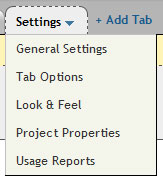
Usage Reports
Under the “Settings” function, you’ll find an option for “Usage Reports”:

The reports you can view are:

We have chosen an “Activity Log Report” and it will give you a list of activities in a time period specified. You can exclude yourself from the search if you prefer to see what other users have been working on only.

The report also shows you which user completed each activity.
Other Features of Central Desktop
Beyond the basics of online collaboration, Central Desktop has some other features that might be useful for your company.
Web Meetings
A basic Central Desktop account includes Web Meetings, but you can only invite one attendee to your meeting. There are upgrade options available, if you need to host larger meetings.
To use web meeting, participants will have to download the “WebMeeting” software.

The meeting allows you to communicate through text chat and web cam. You can also use a white board, record your meeting and more.
Wiki
Wiki allows you to create a knowledge base for your company. Here is a quick peek at a sample Wiki.
Topics are shown, in alphabetical order, on the left and pages can be viewed and edited on the right. You can assign subscribers to the Wiki, so they can edit it as well.

Blog and Forum
There are two more communication features available and that is the blog and forum.
A blog allows for more directed conversation (specific users can post, while others can comment) and the forum allows for more free discussion any assigned user can post a new topic.
Blog and forum posts can be categorized, for easier browsing, helping create a further knowledge base for your company.
Time
Time allows users to record their time spent on specific tasks. This can help you track your expenses and also allow for accurate billing of your own clients.

Overview
At anytime, you can view your Dashboard that gives you an overview of upcoming events and recent activity.

Overall, Central Desktop is a powerful online collaboration and project management tool, but may include too many features for some users.
The addition of Wikis, forums and blogs may create disjointed communication and make it overwhelming for users to make sense of projects.
On the other hand, these features do not have to be activated and the admin can customize the features available in each project, so this may not be an issue.
titlecentral desktop upcoming2011 How to add a project without adding a new workspace in Central Desktopweekly seller activity reportonline desktopknowledge addition central desktopcentral desktop web meeting pricecentral desktop update subscribers bulkcentral desktop knowledge basecentral desktop download webmeetingcentral desktopbatch delete tasks in central desktopassign task central desktopwww#
Related posts:
How To Use Basecamp For Online CollaborationHow To Use Box.net For Online Backup And StorageHow To Create Mindmaps Using FreemindHow To Use SugarSync For Online Backup And Storage87 Ways To Make $100 Or More Per Day Online- Part 1
View the original article here

How To Use Visuals To Achieve Your Goals


Having visual reminders of your goals, dreams, and aspirations helps keep you focused on what’s important to you.

Throughout life’s daily crises, stresses, and distractions, visual reminders can help you remember the big picture.

They can help you overcome challenges and move forward each day toward achieving the life you truly desire.

Knowing that you’re always moving forward brings a confident, peaceful feeling.

You’re sure that, no matter what life brings your way, you will achieve the success you crave.

This feeling is an awesome motivator to keep you going even when the chips are down, and visuals can help you get it.

Try these ways to use visuals as a means of achieving the goals in your life:

1. Post-it note reminders.

This simple method puts your goals and motivators at the forefront.

Buy colorful sticky notes and fun colored pens and commit your goals to paper.

Stick these notes in the places where they matter most so you can see them and think about them often.

Place notes on your bathroom mirror, your headboard, the refrigerator door, on your favorite coffee mug or right on the bottom of your computer monitor.

Any place that you’re likely to glance throughout the day is a good destination for a motivating, goal-setting note.

Make your notes specific, “I want to eat right this week to lose 2 lbs by the 1st,” or broad but motivating, “Today will be a productive and motivating day.

You can do it!”

These sticky notes will encourage productivity throughout the day with simple, basic visuals.

2. Note cards.

Buy a stack of white note cards and commit a goal or aspiration to each one.

Decorate them, write notes on them, and otherwise customize them to suit your needs.

Keep them in your pocket, purse or brief case and refer to them daily as a means of motivating yourself to achieve your goals and dreams.

When you refer to the same note cards on a daily basis, a habit forms.

It is said that 21 days of repeating a task will ingrain it in you.

Check your note cards daily until it becomes a habit, and it will become a vital tool in helping you achieve your goals.

3. Visual mind maps.

This tool will help you organize your goals in a highly visual way.

Create a mind map on a large sheet of poster board. Designate an area for each long-term goal, and add an image and a small amount of text.

Create a cloud of medium and long-term goals around each long-term goal, with lines connecting them to the long-term focus.

Use images, colors, words, and other meaningful visuals to decorate your poster.

Draw your own graphics, clip pictures from magazines, or download images from the internet to create a colorful – and visually appealing – goal-oriented mind map.

Put time and effort into the creation of your visual mind map, and then put it in a place where you’ll see it daily.

This visual will help you keep your short, medium, and long term goals in mind and will consistently remind you of what you want to be focusing on.

Visual reminders of your goals are extremely beneficial in helping you achieve your dreams and aspirations.

These reminders are easy to see on a daily basis, helping you recall your most important goals early on and throughout the day.

If there are specific goals you want to focus on, visual reminders are a great way to help you achieve them.

visuals that remind you of dog

Related posts:

7 Ways To Bring Your Goals To Life

View the original article here


About

Site Info

How to Blog Tricks Copyright; 2011 Designed by ScriptMafia Nulled Blog Edited by Cleve Mast Jean